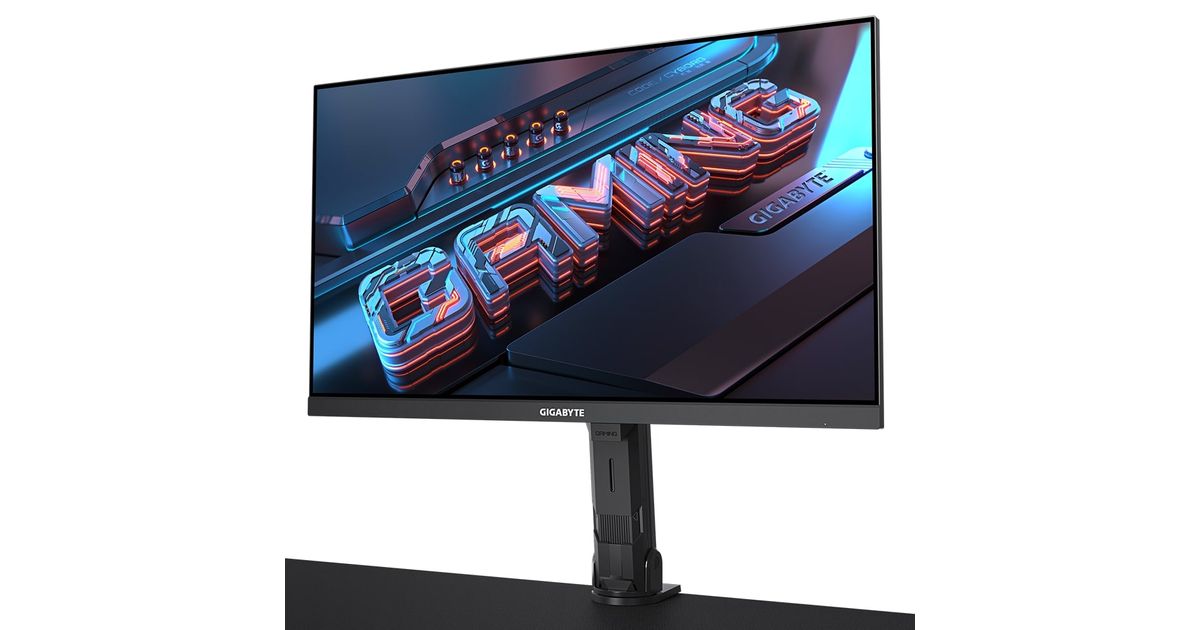
For illustrative purpose only
Gigabyte M28U 71.1 cm (28") 3840 x 2160 pixels 4K Ultra HD LED Black
Gigabyte M28U, 71.1 cm (28"), 3840 x 2160 pixels, 4K Ultra HD, LED, 1 ms, Black
Read more...
Read more...
Product Information
| Information | |
|---|---|
| Manufacturer | Gigabyte |
| Product code | 257883302 |
| EAN | 04719331836481 |
| Manufacturer part number | UPGBA028XSMUAEK |
| Category | Monitors |
| Display | |
|---|---|
| Display diagonal | 71.1 cm (28") |
| Display resolution | 3840 x 2160 pixels |
| Display technology | LED |
| Touchscreen | N |
| HD type | 4K Ultra HD |
| Screen shape | Flat |
| Contrast ratio (typical) | 1000:1 |
| Maximum refresh rate | 144 Hz |
| Display brightness (typical) | 300 cd/m² |
| Response time | 1 ms |
| Viewing angle, horizontal | 178° |
| Viewing angle, vertical | 178° |
| Pixel pitch | 0.16 x 0.16 mm |
| Viewable size, horizontal | 63.2 cm |
| Viewable size, vertical | 36 cm |
| High Dynamic Range (HDR) supported | Y |
| RGB colour space | DCI-P3 |
| Colour gamut | 94% |
| sRGB coverage (typical) | 120% |
| On Screen Display (OSD) | Y |
| Design | |
|---|---|
| Backlight type | Edge LED |
| Market positioning | Gaming |
| Product colour | Black |
| Cable lock slot type | Kensington |
| Tilt adjustment | Y |
| Features | |
|---|---|
| High Dynamic Range (HDR) technology | DisplayHDR 400 |
| Colour depth | 8 bit |
| HBR3 support | Y |
| DisplayPort version | 1.4 |
| VESA mounting | Y |
| Panel mounting interface | 100 x 100 mm |
| Height adjustment | 13 cm |
| Performance | |
|---|---|
| Flicker-free technology | Y |
| Cable lock slot | Y |
| Audio | |
|---|---|
| Built-in speaker(s) | Y |
| Number of speakers | 2 |
| Multimedia | |
|---|---|
| RMS rated power | 6 W |
| Ports & interfaces | |
|---|---|
| Built-in USB hub | Y |
| HDMI | Y |
| Headphone out | Y |
| Number of USB Type-C upstream ports quantity | 1 |
| USB Type-A downstream ports quantity | 3 |
| HDMI ports quantity | 2 |
| HDMI version | 2.1 |
| DisplayPorts quantity | 1 |
| Ergonomics | |
|---|---|
| Height adjustment | Y |
| Pivot | N |
| Swivelling | N |
| Tilt angle range | -5 - 20° |
| Power | |
|---|---|
| Energy efficiency class (SDR) | G |
| Energy efficiency class (HDR) | G |
| Energy consumption (SDR) per 1000 hours | 33 kWh |
| Energy consumption (HDR) per 1000 hours | 53 kWh |
| Power consumption (typical) | 115 W |
| Power consumption (standby) | 0.5 W |
| Power consumption (off) | 0.3 W |
| AC input voltage | 100 - 240 V |
| AC input frequency | 50/60 Hz |
| Energy efficiency scale | A to G |
| Packaging content | |
|---|---|
| Stand included | Y |
| Cables included | AC, DisplayPort, HDMI, USB |
| Other features | |
|---|---|
| Quick start guide | Y |
| Weight & dimensions | |
|---|---|
| Width (with stand) | 636.5 mm |
| Depth (with stand) | 193.6 mm |
| Height (with stand) | 534.2 mm |
| Weight (with stand) | 6.93 kg |
| Width (without stand) | 63.6 cm |
| Depth (without stand) | 6.31 cm |
| Height (without stand) | 37.2 cm |
| Weight (without stand) | 5.18 kg |
| Package weight | 9.7 kg |
| Packaging data | |
|---|---|
| Package width | 890 mm |
| Package depth | 148 mm |
| Package height | 510 mm |
Product Description
THE LAST MILE FOR YOUR GAMING SYSTEM
As an unseen player, monitor is often being underestimated. The truth is monitors form as a synergistic effect and bring out the best performance of PC components. GIGABYTE gaming monitors offer the ultimate specifications and quality, users can truly enjoy upscale performance without the need for extravagance.
One For All
KVM feature allows you to control multiple devices via one set of keyboard, video and mouse. With our exclusive KVM button, you’ll find switching devices cannot be any easier! Quick like a snap!
1ms GTG Response Time
The SuperSpeed IPS technology reduces the response time to 1ms; meanwhile offering the IPS-grade splendid color!
SIMPLE BUT STYLISH
The streamline appearance represents the simplicity of the GIGABYTE gaming series design philosophy, sturdy stand and matte finish built for functional and aesthetic features adding more to the characteristics.
OSD Sidekick
GIGABYTE OSD Sidekick allows you to set the display options with keyboard and mouse, giving you the easiest way to adjust monitor settings.
As an unseen player, monitor is often being underestimated. The truth is monitors form as a synergistic effect and bring out the best performance of PC components. GIGABYTE gaming monitors offer the ultimate specifications and quality, users can truly enjoy upscale performance without the need for extravagance.
One For All
KVM feature allows you to control multiple devices via one set of keyboard, video and mouse. With our exclusive KVM button, you’ll find switching devices cannot be any easier! Quick like a snap!
1ms GTG Response Time
The SuperSpeed IPS technology reduces the response time to 1ms; meanwhile offering the IPS-grade splendid color!
SIMPLE BUT STYLISH
The streamline appearance represents the simplicity of the GIGABYTE gaming series design philosophy, sturdy stand and matte finish built for functional and aesthetic features adding more to the characteristics.
OSD Sidekick
GIGABYTE OSD Sidekick allows you to set the display options with keyboard and mouse, giving you the easiest way to adjust monitor settings.