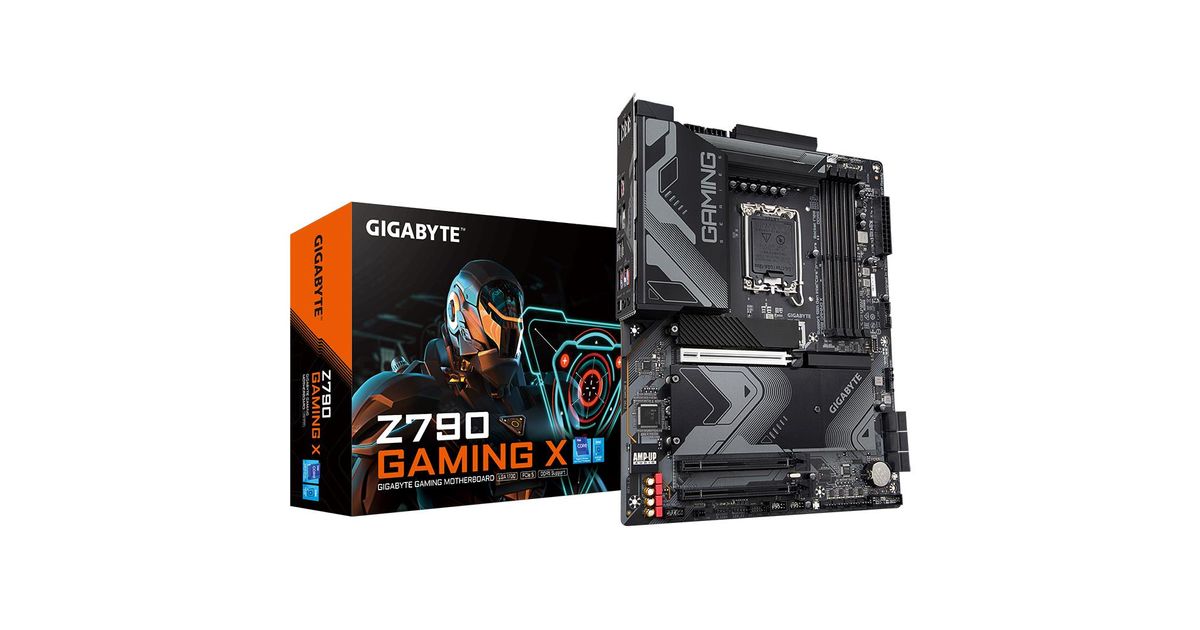
For illustrative purpose only
Gigabyte Z790 GAMING X motherboard Intel Z790 LGA 1700 ATX
Gigabyte Z790 GAMING X, Intel, LGA 1700, Intel® Celeron®, Intel® Core™ i3, Intel® Core™ i5, Intel® Core™ i7, Intel® Core™ i9,..., LGA 1700, DDR5-SDRAM, 128 GB
Read more...
Read more...
Product Information
| Information | |
|---|---|
| Manufacturer | Gigabyte |
| Product code | 129129558 |
| EAN | 04719331849986 |
| Manufacturer part number | Z790 Gaming X |
| Category | Motherboards |
| Processor | |
|---|---|
| Processor manufacturer | Intel |
| Processor socket | LGA 1700 |
| Performance | |
|---|---|
| Compatible processor series | Intel® Celeron®, Intel® Core™ i3, Intel® Core™ i5, Intel® Core™ i7, Intel® Core™ i9, Intel® Pentium® Gold |
| Supported processor sockets | LGA 1700 |
| Memory | |
|---|---|
| Supported memory types | DDR5-SDRAM |
| Number of memory slots | 4 |
| Maximum internal memory | 128 GB |
| Memory slots type | DIMM |
| Memory channels | Dual-channel |
| ECC | Y |
| Non-ECC | Y |
| Supported memory clock speeds | 4000,4800,5200,5400,5600,5800,6000,6200,6400,6600,6800,7000,7200,7400,7600 MHz |
| Supported memory clock speed (max) | 7600 MHz |
| Unbuffered memory | Y |
| Storage controllers | |
|---|---|
| Supported storage drive interfaces | M.2, PCI Express 4.0, SATA III |
| Supported storage drive types | HDD & SSD |
| RAID support | Y |
| RAID levels | 0, 1, 5, 10 |
| Features | |
|---|---|
| Number of storage drives supported | 10 |
| HDCP | Y |
| DisplayPort version | 1.2 |
| USB connector type | USB Type-A, USB Type-C |
| Motherboard form factor | ATX |
| Motherboard chipset family | Intel |
| Motherboard chipset | Intel Z790 |
| Audio output channels | 7.1 channels |
| PC health monitoring | Fan, Temperature, Voltage, Water cooling |
| Graphics | |
|---|---|
| Parallel processing technology support | Crossfire |
| Maximum resolution | 4096 x 2304 pixels |
| Internal I/O | |
|---|---|
| USB 2.0 connectors | 2 |
| USB 3.2 Gen 1 (3.1 Gen 1) connectors | 1 |
| USB 3.2 Gen 2 (3.1 Gen 2) connectors | 1 |
| Number of SATA III connectors | 6 |
| Front panel audio connector | Y |
| Front panel connector | Y |
| ATX Power connector (24-pin) | Y |
| CPU fan connector | Y |
| EPS power connector (8-pin) | Y |
| TPM connector | Y |
| Thunderbolt headers | 2 |
| 12V power connector | Y |
| RGB LED pin header | Y |
| Other features | |
|---|---|
| USB 2.0 ports quantity | 4 |
| Ports & interfaces | |
|---|---|
| USB 3.2 Gen 1 (3.1 Gen 1) Type-A ports quantity | 3 |
| Ethernet LAN (RJ-45) ports | 1 |
| HDMI ports quantity | 1 |
| USB 3.2 Gen 2x2 Type-C ports quantity | 1 |
| HDMI version | 2.0 |
| DisplayPorts quantity | 1 |
| Headphone outputs | 2 |
| Microphone in | Y |
| S/PDIF out port | Y |
| Rear panel I/O ports | |
|---|---|
| USB 3.2 Gen 2 (3.1 Gen 2) Type-A ports quantity | 2 |
| WiFi-AP antenna jack | 2 |
| Network | |
|---|---|
| Wi-Fi | N |
| Ethernet LAN | Y |
| Ethernet interface type | 2.5 Gigabit Ethernet |
| Design | |
|---|---|
| Component for | PC |
| Software | |
|---|---|
| Windows operating systems supported | Windows 10 x64, Windows 11 x64 |
| Expansion slots | |
|---|---|
| PCI Express x16 slots | 3 |
| Number of M.2 (M) slots | 4 |
| BIOS | |
|---|---|
| BIOS type | UEFI AMI |
| BIOS memory size | 256 Mbit |
| ACPI version | 5.0 |
| Clear CMOS jumper | Y |
| Desktop Management Interface (DMI) version | 2.7 |
| System Management BIOS (SMBIOS) version | 2.7 |
| Weight & dimensions | |
|---|---|
| Width | 305 mm |
| Depth | 244 mm |
| Packaging content | |
|---|---|
| Cables included | SATA |
Product Description
UNPARALLELED PERFORMANCE
With the fast-moving technology changes, GIGABYTE always follows the latest trends and provides customers with advanced features and latest technologies. GIGABYTE motherboards are equipped with upgraded power solution, latest storage standards and outstanding connectivity to enable optimized performance for gaming.
OUTSTANDING THERMAL DESIGN
GIGABYTE Motherboards' Un-throttled performance is guaranteed by innovative and optimized thermal design to ensure the best CPU, Chipset, SSD stability and low temperatures under full load application and gaming performance.
4X Large Surface
Increased surface area up to 4X larger compared to traditional heatsinks. It improves heat dissipation from the MOSFETs.
Real One-piece Build
TMOS is a TRUE single piece heatsink. Its one-piece design and larger surface drastically improve the cooling performance against competitors' multi-piece design.
Multi-Cut Design
TMOS features several channels and inlets on the heatsink. This design allows for the air flow to go through which leads to a great improvement of the heat transfer performance.
M.2 Thermal Guard
With durability in mind, GIGABYTE provides a thermal solution for M.2 SSD devices. The M.2 Thermal Guard prevents throttling and bottlenecks from high speed M.2 SSDs as it helps to dissipate heat before it becomes an issue.
SMART FAN 6
Smart Fan 6 contains several unique cooling features that ensure gaming PC maintain its performance while staying cool and quiet. Multiple fan headers can support PWM/DC fan and pump, and users can easily define each fan curve based on different temperature sensors across the board via intuitive user interface.
Four PCIe 4.0x4 M.2
GIGABYTE Motherboards are focused on delivering M.2 technology to enthusiasts who want to maximize their system's potential.
Connecting the Future - Rear USB 3.2 Gen 2x2 Type-C®
Featuring the USB 3.2 Gen 2x2 design which is doubled the performance than previous generation of USB 3.2 Gen 2. It works up to 20Gbps ultra-fast data transfer while connecting to USB 3.2 compliant peripherals. Through the USB Type-C® connector, users can enjoy the flexibility of reversible connection to access and store massive amounts of data rapidly.
High-End Audio Capacitors
GIGABYTE motherboards use high-end audio capacitors. These high quality capacitors help deliver high resolution and high fidelity audio to provide the most realistic sound effects for gamers.
Audio Noise Guard
GIGABYTE motherboards feature an audio noise guard that essentially separates the board’s sensitive analog audio components from potential noise pollution at the PCB level.
RGB Fusion Multi-Zone Light Show Design
Now offering more LED customizations than ever, users can truly adapt their PC to represent their lifestyle. With full RGB support and a redesigned RGB Fusion 2.0 application, the user has complete control over the LEDs which surround the motherboard.
Multi-key
A multi-function reset button that can be reconfigured to other function in BIOS for different user scenarios.
PCIe EZ-Latch
Unlock the latch of the PCIe slot easily when remove the graphics card in the PCIe slot.
Q-Flash Plus
Update the BIOS easily without installing the CPU, memory and graphics card.
With GIGABYTE Q-Flash Plus, you don't need to install the CPU, memory and graphics card nor enter the BIOS menu to flash the BIOS. Just download and save a new BIOS file (rename to gigabyte.bin) on the USB flash drive, then press the dedicated Q-Flash Plus button and you’re good to go!
With the fast-moving technology changes, GIGABYTE always follows the latest trends and provides customers with advanced features and latest technologies. GIGABYTE motherboards are equipped with upgraded power solution, latest storage standards and outstanding connectivity to enable optimized performance for gaming.
OUTSTANDING THERMAL DESIGN
GIGABYTE Motherboards' Un-throttled performance is guaranteed by innovative and optimized thermal design to ensure the best CPU, Chipset, SSD stability and low temperatures under full load application and gaming performance.
4X Large Surface
Increased surface area up to 4X larger compared to traditional heatsinks. It improves heat dissipation from the MOSFETs.
Real One-piece Build
TMOS is a TRUE single piece heatsink. Its one-piece design and larger surface drastically improve the cooling performance against competitors' multi-piece design.
Multi-Cut Design
TMOS features several channels and inlets on the heatsink. This design allows for the air flow to go through which leads to a great improvement of the heat transfer performance.
M.2 Thermal Guard
With durability in mind, GIGABYTE provides a thermal solution for M.2 SSD devices. The M.2 Thermal Guard prevents throttling and bottlenecks from high speed M.2 SSDs as it helps to dissipate heat before it becomes an issue.
SMART FAN 6
Smart Fan 6 contains several unique cooling features that ensure gaming PC maintain its performance while staying cool and quiet. Multiple fan headers can support PWM/DC fan and pump, and users can easily define each fan curve based on different temperature sensors across the board via intuitive user interface.
Four PCIe 4.0x4 M.2
GIGABYTE Motherboards are focused on delivering M.2 technology to enthusiasts who want to maximize their system's potential.
Connecting the Future - Rear USB 3.2 Gen 2x2 Type-C®
Featuring the USB 3.2 Gen 2x2 design which is doubled the performance than previous generation of USB 3.2 Gen 2. It works up to 20Gbps ultra-fast data transfer while connecting to USB 3.2 compliant peripherals. Through the USB Type-C® connector, users can enjoy the flexibility of reversible connection to access and store massive amounts of data rapidly.
High-End Audio Capacitors
GIGABYTE motherboards use high-end audio capacitors. These high quality capacitors help deliver high resolution and high fidelity audio to provide the most realistic sound effects for gamers.
Audio Noise Guard
GIGABYTE motherboards feature an audio noise guard that essentially separates the board’s sensitive analog audio components from potential noise pollution at the PCB level.
RGB Fusion Multi-Zone Light Show Design
Now offering more LED customizations than ever, users can truly adapt their PC to represent their lifestyle. With full RGB support and a redesigned RGB Fusion 2.0 application, the user has complete control over the LEDs which surround the motherboard.
Multi-key
A multi-function reset button that can be reconfigured to other function in BIOS for different user scenarios.
PCIe EZ-Latch
Unlock the latch of the PCIe slot easily when remove the graphics card in the PCIe slot.
Q-Flash Plus
Update the BIOS easily without installing the CPU, memory and graphics card.
With GIGABYTE Q-Flash Plus, you don't need to install the CPU, memory and graphics card nor enter the BIOS menu to flash the BIOS. Just download and save a new BIOS file (rename to gigabyte.bin) on the USB flash drive, then press the dedicated Q-Flash Plus button and you’re good to go!