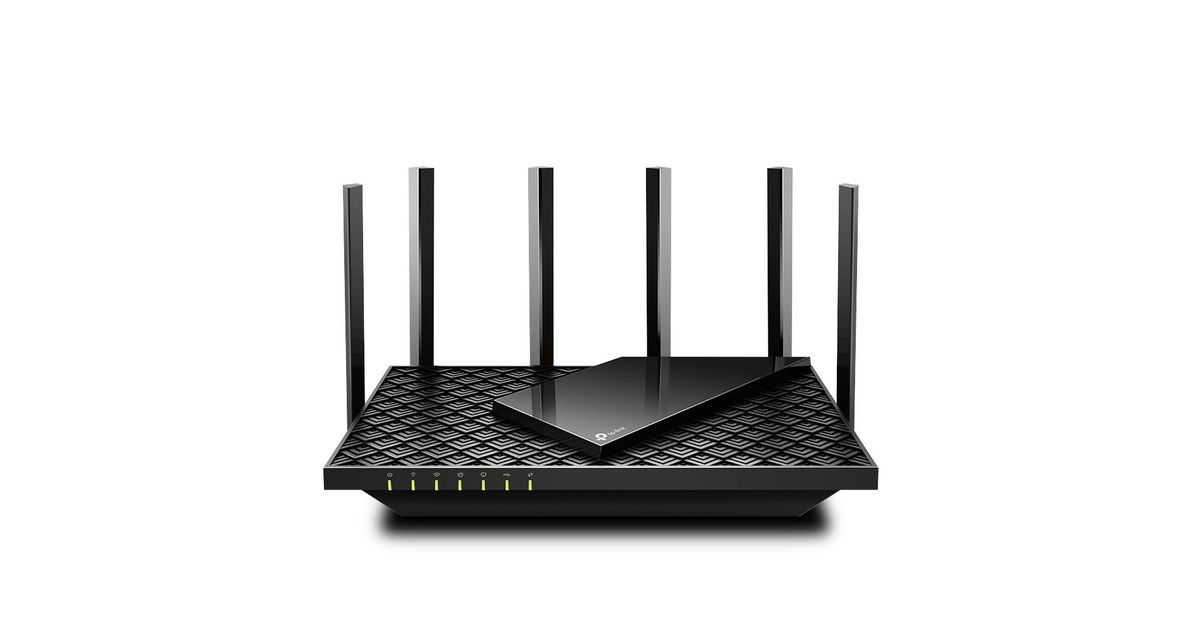
Toote tegelik värvus võib erineda piltidel kujutatavast ning pildid on
illustratiivsed.
TP-Link Archer AX5400 Multi-Gigabit WiFi 6 Router
TP-Link Archer AX5400 Multi-Gigabit WiFi 6 Router, Wi-Fi 6 (802.11ax), Dual-band (2.4 GHz / 5 GHz), Ethernet LAN, Black, Desktop/pole router
Read more...
Read more...
Product Information
| Information | |
|---|---|
| Manufacturer | TP-Link |
| Product code | 129003830 |
| EAN | 04897098686782 |
| Manufacturer part number | Archer AX72 Pro |
| Category | Routers |
| WAN connection | |
|---|---|
| Ethernet WAN | Y |
| DSL WAN | N |
| SIM card slot | N |
| 3G/4G USB modem compatibility | N |
| WAN connection type | RJ-45 |
| Network | |
|---|---|
| Wi-Fi band | Dual-band (2.4 GHz / 5 GHz) |
| Top Wi-Fi standard | Wi-Fi 6 (802.11ax) |
| Wi-Fi standards | Wi-Fi 6 (802.11ax) |
| Ethernet LAN | Y |
| Ethernet LAN interface type | Gigabit Ethernet |
| Port forwarding | Y |
| Port triggering | Y |
| Dynamic DNS (DDNS) | Y |
| USB sharing | Y |
| Support Samba (storage) | Y |
| VPN server | OpenVPN, PPTP |
| Media server | Y |
| Security algorithms | WPA, WPA2, WPA3 |
| DHCP client | Y |
| Wireless LAN features | |
|---|---|
| WLAN data transfer rate (max) | 4804 Mbit/s |
| WLAN data transfer rate (first band) | 4804 Mbit/s |
| WLAN data transfer rate (second band) | 574 Mbit/s |
| High power | Y |
| Other features | |
|---|---|
| Networking standards | IEEE 802.11a, IEEE 802.11ac, IEEE 802.11ax, IEEE 802.11b, IEEE 802.11g, IEEE 802.11n |
| Antennas quantity | 6 |
| Data transmission | |
|---|---|
| Static route | Y |
| Features | |
|---|---|
| Number of guest networks (2.4 GHz) | 1 |
| Number of guest networks (5 GHz) | 1 |
| Antenna type | 3x3 |
| Built-in processor | Y |
| Certification | FCC, CE, RoHS |
| Performance | |
|---|---|
| Built-in FTP server | Y |
| DHCP server | Y |
| Power source type | DC |
| Security | |
|---|---|
| VPN support | OpenVPN, PPTP |
| WPS push button | Y |
| Firewall | Y |
| Firewall security | SPI Firewall |
| Guest access | Y |
| Stateful Packet Inspection (SPI) | Y |
| DoS attack prevention | Y |
| Network address translation (NAT) | Y |
| NAT functionality | Port Forwarding Port Triggering DMZ UPnP Virtual Server |
| Ports & interfaces | |
|---|---|
| Ethernet LAN (RJ-45) ports | 5 |
| USB port | Y |
| USB 3.2 Gen 1 (3.1 Gen 1) Type-A ports quantity | 1 |
| Management features | |
|---|---|
| Quality of Service (QoS) support | Y |
| Design | |
|---|---|
| Reset button | Y |
| Product type | Desktop/pole router |
| Product colour | Black |
| On/off switch | Y |
| Antenna design | External |
| Ergonomics | |
|---|---|
| Parental control | Y |
| Indication light | Y |
| Protocols | |
|---|---|
| DMZ support | Y |
| Universal Plug and Play (UPnP) | Y |
| Packaging content | |
|---|---|
| Cables included | LAN (RJ-45) |
| AC adapter included | Y |
| Packaging data | |
|---|---|
| Antenna included | Y |
| Quick installation guide | Y |
| Number of products included | 1 pc(s) |
| Processor | |
|---|---|
| Processor frequency | 1000 MHz |
| Processor cores | 2 |
| Operational conditions | |
|---|---|
| Operating temperature (T-T) | 0 - 40 °C |
| Storage temperature (T-T) | -40 - 70 °C |
| Operating relative humidity (H-H) | 10 - 90% |
| Storage relative humidity (H-H) | 5 - 90% |
| Weight & dimensions | |
|---|---|
| Width | 272.5 mm |
| Depth | 147.2 mm |
| Height | 49.2 mm |
Product Description
FREE NETWORK CONGESTION WITH 2.5G PORTS
AX5400 Dual-Band Wi-Fi 6 Router
Full Release — Multi-Gig Wired Connections
In addition to stunning wireless speeds, AX72 Pro also provides premium wired connections. A 2.5Gbps port and 1 Gbps Port make full use of gigabit speeds from your local ISP. Break through the 1G bottleneck and drive your devices to peak performance. WAN/LAN support gives you remarkable flexibility to tailor both ports to fit your network’s need.
Warp Speed for Smooth 8K Streaming
Drastically improved speeds enable streaming, fast downloading, and gaming, all at same time. Need to go faster? Hop on 5 GHz with full speed boosting features, to stream multiple 8K videos without lagging.
Extensive Wi-Fi Coverage with Advanced Technology
Enjoy stable Wi-Fi connections even in the kitchen and bedroom. High-Power FEM, 6× Antennas, Beamforming, and 4T4R of 5GHz structures combine to adapt Wi-Fi coverage to perfectly fit your home and concentrate signal strength towards your devices.
USB 3.0 Ports
Easily share files between connected devices by plugging into an external drive. You can even make it your personal cloud storage and access it from outside securely.
Connect More, Stay Fast
Easily handle dozens of devices streaming and gaming at the same time — OFDMA and MU-MIMO combine to fure-proof your home network by providing greater capacity to connect more devices.
OFDMA
Enables differnet devices to share one transmission stream, increasing efficiency.
MU-MIMO
Transmits data to different devices simultaneously using multiple streams.
VPN Client and VPN Server:
More Granular VPN Function Usage
When using the VPN Client function, the device connected to the router can directly access the VPN server for remote office and cross-regional access. When using the VPN Server function, external devices can access the VPN server, including remote desktops, NAS, printers, cameras, and other devices in the home network.
TP-Link HomeShield:
Advanced Security for Your Everyday Devices
With TP-Link HomeShield, enjoy advanced secuirty features delivering a safe environment that protects your family and network's data and privacy.
Home Network Scanner
Real-time network scanner to detect potential threats and security issues.
Parental Controls
Manage time online and block inappropritate content keeping your familiy safe online.
Quality of Service
Assign your favorite devices to have the fastest connections for top performance.
TP-Link OneMesh™:
Flexibly Create Whole Home WiFi with Archer AX72 Pro
Want to build a whole-home Wi-Fi? Archer AX72 Pro supports OneMesh to form seamless whole-home coverage, preventing drops and lag when moving between signals.
Easy Setup and Use
Whether you prefer the intuitive Tether app or TP-Link’s powerful web interface, you can set up your Archer AX72 Pro in minutes. The Tether App allows you to manage network settings from any Android or iOS device.
Protect Your Children
Block inappropriate content for your children, and customize a time range for better online habits.
New Connection Notification
You will be notified by your phone when new devices connect. Kick-off any suspicious connections and block them. It’s as simple as that.
Easy Firmware Upgrade
Tired of upgrading firmware? OTA updates enable easy firmware upgrades with a click in the management panel. To keep your security and functions always up-to-date, just turn on the auto-schedule.
AX5400 Dual-Band Wi-Fi 6 Router
Full Release — Multi-Gig Wired Connections
In addition to stunning wireless speeds, AX72 Pro also provides premium wired connections. A 2.5Gbps port and 1 Gbps Port make full use of gigabit speeds from your local ISP. Break through the 1G bottleneck and drive your devices to peak performance. WAN/LAN support gives you remarkable flexibility to tailor both ports to fit your network’s need.
Warp Speed for Smooth 8K Streaming
Drastically improved speeds enable streaming, fast downloading, and gaming, all at same time. Need to go faster? Hop on 5 GHz with full speed boosting features, to stream multiple 8K videos without lagging.
Extensive Wi-Fi Coverage with Advanced Technology
Enjoy stable Wi-Fi connections even in the kitchen and bedroom. High-Power FEM, 6× Antennas, Beamforming, and 4T4R of 5GHz structures combine to adapt Wi-Fi coverage to perfectly fit your home and concentrate signal strength towards your devices.
USB 3.0 Ports
Easily share files between connected devices by plugging into an external drive. You can even make it your personal cloud storage and access it from outside securely.
Connect More, Stay Fast
Easily handle dozens of devices streaming and gaming at the same time — OFDMA and MU-MIMO combine to fure-proof your home network by providing greater capacity to connect more devices.
OFDMA
Enables differnet devices to share one transmission stream, increasing efficiency.
MU-MIMO
Transmits data to different devices simultaneously using multiple streams.
VPN Client and VPN Server:
More Granular VPN Function Usage
When using the VPN Client function, the device connected to the router can directly access the VPN server for remote office and cross-regional access. When using the VPN Server function, external devices can access the VPN server, including remote desktops, NAS, printers, cameras, and other devices in the home network.
TP-Link HomeShield:
Advanced Security for Your Everyday Devices
With TP-Link HomeShield, enjoy advanced secuirty features delivering a safe environment that protects your family and network's data and privacy.
Home Network Scanner
Real-time network scanner to detect potential threats and security issues.
Parental Controls
Manage time online and block inappropritate content keeping your familiy safe online.
Quality of Service
Assign your favorite devices to have the fastest connections for top performance.
TP-Link OneMesh™:
Flexibly Create Whole Home WiFi with Archer AX72 Pro
Want to build a whole-home Wi-Fi? Archer AX72 Pro supports OneMesh to form seamless whole-home coverage, preventing drops and lag when moving between signals.
Easy Setup and Use
Whether you prefer the intuitive Tether app or TP-Link’s powerful web interface, you can set up your Archer AX72 Pro in minutes. The Tether App allows you to manage network settings from any Android or iOS device.
Protect Your Children
Block inappropriate content for your children, and customize a time range for better online habits.
New Connection Notification
You will be notified by your phone when new devices connect. Kick-off any suspicious connections and block them. It’s as simple as that.
Easy Firmware Upgrade
Tired of upgrading firmware? OTA updates enable easy firmware upgrades with a click in the management panel. To keep your security and functions always up-to-date, just turn on the auto-schedule.